Preparing the Hardware
Pescle Rodents detects rodents by analyzing footage from installed trail cameras with AI. Before installing a camera, check the following settings and conditions.
Pre-installation Checklist
All batteries are new.
An SD card is inserted and readable.
The shooting mode is set to movie mode.
Pescle Rodents uses videos to identify rodents, so still image mode cannot be used.
The signal at the installation site is good. The trail camera communicates over a mobile network.
After checking the above, set the power switch on the main unit to “ON” and install the camera.
For detailed steps to check the shooting mode and antenna strength, see Initial response to equipment problems for project administrators.
Setting an Operation Schedule (Optional)
Setting an operation schedule on the trail camera helps prevent false alarms and extends battery life.
1. Set the power switch to “SETUP”.
2. Select “Trigger” from the top menu and enable “Start-Stop1”.
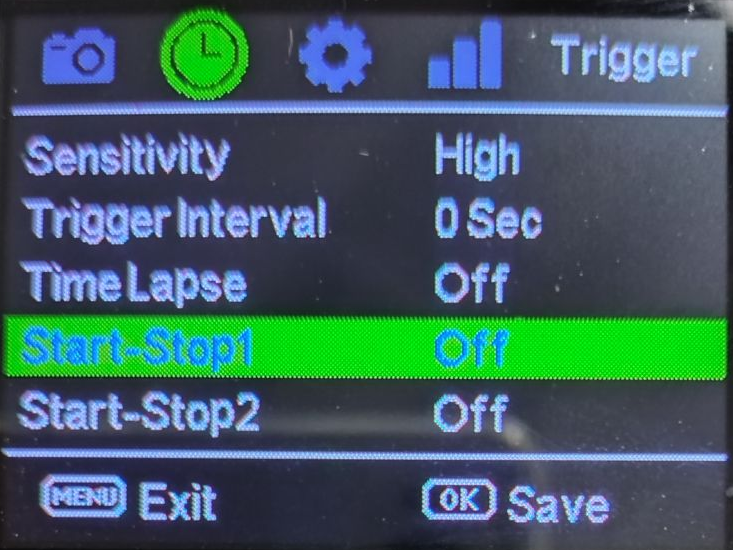
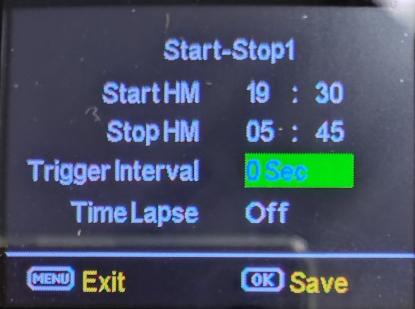
3. Set the start time and end time. Set the delay to “0 seconds” and the time lapse to “Off”.
4. After completing the settings, be sure to set the power switch back to “ON”.
When using both Schedule 1 and Schedule 2, make sure the configured times do not overlap.
Registering the Device
Once the camera is ready, a project administrator registers the device from the web screen. See Registering, Editing, and Deleting Devices.